OpenSeo?
OpenSeo는 Semrush와 Ahrefs의 대안으로 나온 오픈소스 프로젝트입니다.
링크: https://github.com/every-app/open-seo
클로드 코드, 오픈클로같은 다양한 하네스에서 사용할 수 있는데요, 저는 오픈코드에서 사용해봤습니다.
화제가 되면서 많은 깃허브 즐겨찾기를 얻고 와이 콤비네이터에도 합류했습니다.
기존 서비스 Semrush의 월간 비용이 약 139$, Ahrefs가 129$에서 시작하는 것에 비해 OpenSeo는 약 10$로 상당히 저렴한데요, 대체재가 될 수 있을지 살펴보겠습니다.
사용 방법
OpenSeo 계정을 만들고 원하는 하네스에 연결하면 됩니다. OpenSeo에서 제공하는 에이전트용 프롬프트가 있는데 그걸 사용하는 하네스에 붙여넣으면 알아서 설정해줍니다.
현재 제공되는 프롬프트입니다.
Set up OpenSEO in this agent. Do what you can; guide me through anything that needs my input.

## 1. Check this agent

- Identify this agent and its version. Ask only if you cannot tell.
- Check for an existing OpenSEO connection. Preserve other integrations and avoid duplicates.

## 2. Install the plugin first

The official plugin bundles MCP + SEO skills, with OpenSEO namespacing and shared updates.

- **Codex:** follow the [plugin guide](https://openseo.so/docs/codex-plugin).
- **Claude Code:** follow the [plugin guide](https://openseo.so/docs/claude-code-plugin).
- **Other agents:** verify plugin compatibility in their current documentation.
- Check the installed client's help before running commands.

## 3. Fall back to MCP + skills

If the plugin is unsupported:

- Add `https://app.openseo.so/mcp` using the [MCP guide](https://openseo.so/docs/mcp).
- Install the [public SEO skills](https://openseo.so/docs/skills/setup) for this agent only.
- Do not copy internal repository skills or duplicate bundled skills.
- If skills are unsupported, use MCP alone and link to the workflow guides.

For self-hosted OpenSEO, use its endpoint directly; the official plugin targets the hosted service.

## 4. Sign in

- **Prefer OAuth.** Start login; let me approve it in my browser.
- **No OAuth?** Send me to `https://app.openseo.so/settings` → API keys. Have me enter the key in the client's secret settings or environment, never chat or a repository.
- **Manual setup needed?** Use this agent’s current documentation and give only the steps I need to do myself.

## 5. Reload and verify

- Use the current agent’s native reload flow, checking its installed version, help, or official documentation. Prefer automatic discovery or an in-place reload; restart only if required to load the new tools and skills.
- Once tools load in this session, run whoami and list_projects (free reads). Check skill discovery too. If a reload needs my action, give the instructions rather than repeatedly retrying unavailable tools.
- Track installation, sign-in, and verification separately. A connected server is not proof that this session can use its tools. Never claim verification before the free reads succeed.
- Do not create projects or run paid research during installation.

## 6. Finish with a short handoff

Keep progress updates brief. The final reply must be **140 words or fewer** and follow this template:

**Status**
[Briefly say what succeeded or what blocked setup.]

**Next**
1. `[Give the native reload command or UI action for this agent, only if needed.]` Then say “Check that OpenSEO is connected.” Approve sign-in if prompted.
2. Try one of these:
   - `[SEO Audit invocation]` **(recommended)** — find your website's biggest SEO issues.
   - `[SEO Project Setup invocation]` — interview you about your website and set up its project context.
   - `[Keyword Research invocation]` — find keywords worth targeting.
   - `[Local SEO invocation]` — review your Google Business Profile and local competitors.

Want to know what was set up? Just ask.

Adapt the template to the actual result:
- If installation failed, name the blocker and replace reload with the fix. If fully verified, say it is ready and omit reload. Do not claim sign-in failed or is required merely because tools need reloading.
- Recommend this agent’s idiomatic way to invoke each installed skill: its native command, mention, picker, or natural-language request. Use the discovered skill name and plugin namespace; do not assume `/skill-name` works everywhere or create aliases to force it. Check the agent’s help or official documentation when unsure. If skills are unsupported, give equivalent plain-language requests using the connected tools. Recommend workflows; do not run them during installation.
- Keep tool names such as whoami and list_projects in your checks, not the final reply. Omit versions, paths, connection details, skill counts, other integrations, and cleanup commands unless they explain the blocker or I ask. Do not add more sections or a verification checklist.
함께 제공되는 에이전트용 스킬들도 있습니다.
- /seo-coach -seo 코칭
- /seo-project-setup – seo 프로젝트 설정
- /seo-audit – seo 검사
- /keyword-research – 키워드 조사
- /keyword-clustering – 키워드를 페이지에 매핑
- /competitive-landscape 시장 분석
- /competitor-analysis 경쟁자의 seo 분석
- /link-prospecting – 링크를 연결할 만한 대상을 찾고, 이들에게 보낼 섭외 메일 초안을 작성
- /local-seo – 로컬 seo 검사
- /seo-report – 스킬 사용 결과를 리포트 페이지에 리포트로 저장
대시보드

대시보드에서도 직접 다양한 기능들을 써볼 수 있습니다.
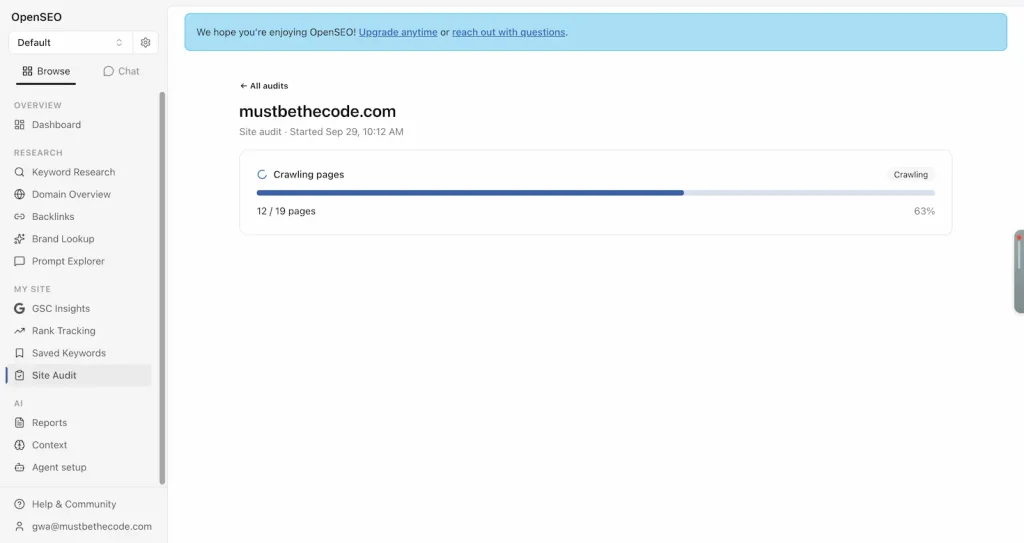
저는 사이트 검사를 대시보드에서 진행해보겠습니다.
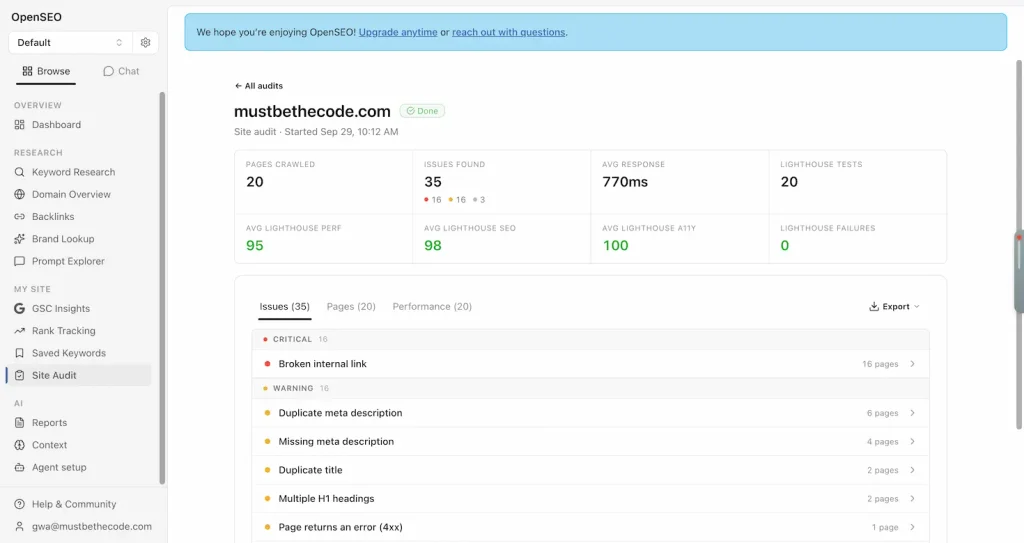
웹사이트의 상황을 알 수 있었습니다. 내부 링크 문제는 오픈코드를 통해 AI에 물어보니 이메일 보안 관련이라 무시해도 된다고 하네요. 다만 메타 설명이나 H1은 고쳐야겠습니다.
다행이 웹사이트 속도는 빠르게 나오네요.
마치며
SEO 서비스가 비싸기도 하고 어디서부터 배워야 할지 잘 몰랐는데 OpenSeo라는 서비스 덕분에 진입 장벽이 조금이라도 더 낮아진것 같습니다.
일단은 기본적인 기능만 써봤지만 활용도가 무궁무진할 것 같습니다. 10$ 플랜 구독도 고려하고 있습니다. 앞으로가 기대되는 프로젝트네요!